Ask first, then chat: designing AI that finance modellers can trust
 Val·November 26, 2026·7 min read
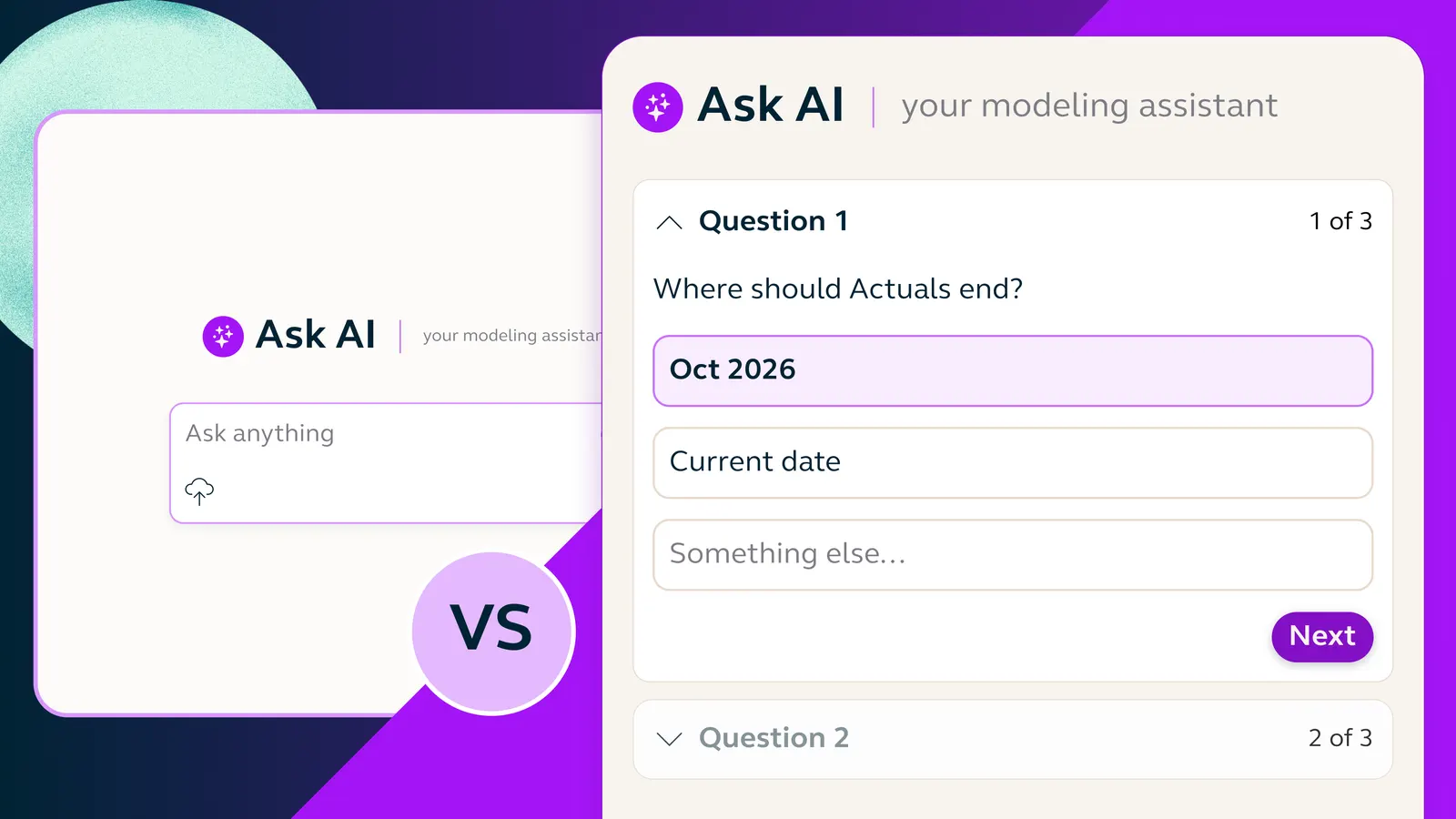
Most AI tools hand you a chat box and hope you ask the right thing. For finance modellers bringing years-old spreadsheets, we flipped it. Our lead UX designer Val De Rubeis explains why.
The blank space syndrome
An empty input box. A blinking cursor. And a user with no idea where to start.
Anyone who works on apps and software knows onboarding problems well. Short videos, explanatory overlays and tooltips that are very often ignored. Production effort defeated by the power of the "Skip" button. Then LLMs arrived, and many companies thought the solution had finally come. Why impose an explanation up front, instead of leaving users free to ask "how do I do X?" or "where is Y?"
After all, one of Nielsen's 10 usability heuristics is "user control and freedom". The problem is that we often forget this "law" is tied to escape routes and undo and redo, which are not so transparent or accurate in generative models.
So the trend of the moment won over time for reflection, and the chat arrived. Everywhere. In financial software, in HR platforms, and in apps that until recently had no need to chat. And the onboarding problem didn't disappear, it just moved. Before, users had to learn where things were. Now they have to know what to ask, and how to ask it.
But it isn't a design choice.
Why chat isn't always the right solution
Chat has the advantage of simplicity. A free field to type in and a button to send. But the impression of simplicity doesn't always match reality: when an interface is oversimplified, the complexity doesn't disappear, it moves to the user.
Jakob Nielsen reflects on the simplicity of the chatbot and calls this problem the articulation barrier: you need to know what you want, and you need to be able to explain it clearly and precisely enough for the system to act with effective results.
A study of how non-experts write prompts showed that users struggled to make progress. Designing prompts that work means spotting where the AI makes mistakes, finding ways around them, and testing those fixes systematically. They describe these as "challenging tasks even for LLM experts". And the participants' habit of instructing the AI as if it were a person was itself one of the barriers.
And what about the interface? Same story.
Don Norman taught us this in The Design of Everyday Things, and Amelia Wattenberger applies it to AI in Why Chatbots Are Not the Future. Norman talked about door handles. Wattenberger talks about gloves, which are shaped like hands and show you how to put them on. With a chatbot, there's no way to tell what it's for. Is it a search bar? A login? Or an LLM able to rebuild your financial model?
There are no concrete hints about what to ask, and above all how to ask it. You may have noticed that ChatGPT's placeholder has changed from "Ask anything" to "Ask ChatGPT". It isn't a solution, but it's definitely an improvement, nudging users to notice the difference between talking to a person and chatting with an AI.
To round off the usability assessment, chat goes against another heuristic: it asks people to 'recall' instead of 'recognise'. And when onboarding into a new product, recall is exactly what new users can't do.
The AI trend
The real problem isn't the chatbot, but following the trend of the moment. At some point, every product simply had to have an AI feature, and companies rushed to catch up, focusing on implementation instead of experience. So, the chatbot wasn't a considered choice, but a default.
"If the AI needs a new prompting habit, or answers without the context of the system it sits in, people won't use it." - founder interviewed at Banyan Software.
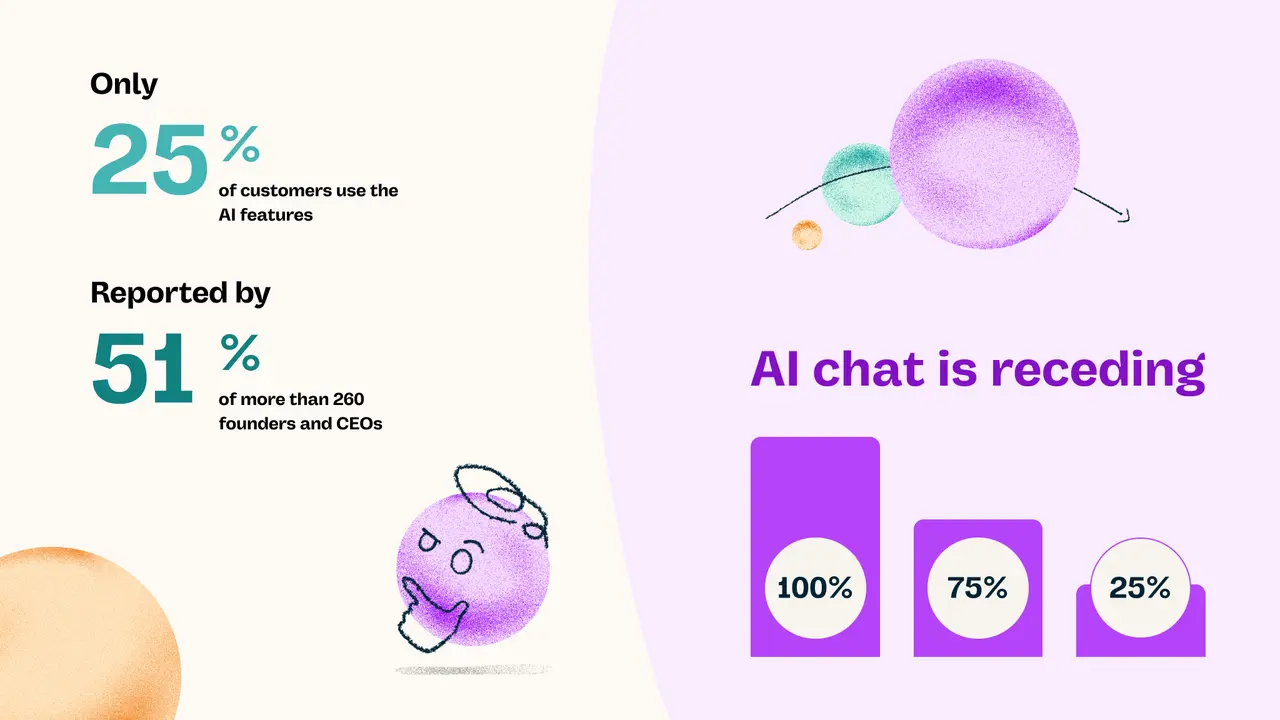
The consequences of this AI rush are starting to show. In a 2026 survey, Banyan Software found that 51% of more than 260 founders and CEOs saw fewer than one in four customers use their AI features. One of the founders interviewed explained why: if the AI needs a new prompting habit, or answers without the context of the system it sits in, people won't use it.
The problem isn't technological. It's a design and product problem, because it starts with the wrong question: "Where do we add the AI chat?", instead of investigating what users are trying to do.
This is where UX designers are called in. Anyone can put a chat into a product. But deciding which kind of interaction fits best, and bringing the evidence to back it up, is what we're called to do at this particular moment.
What we did at Kaleidoscope
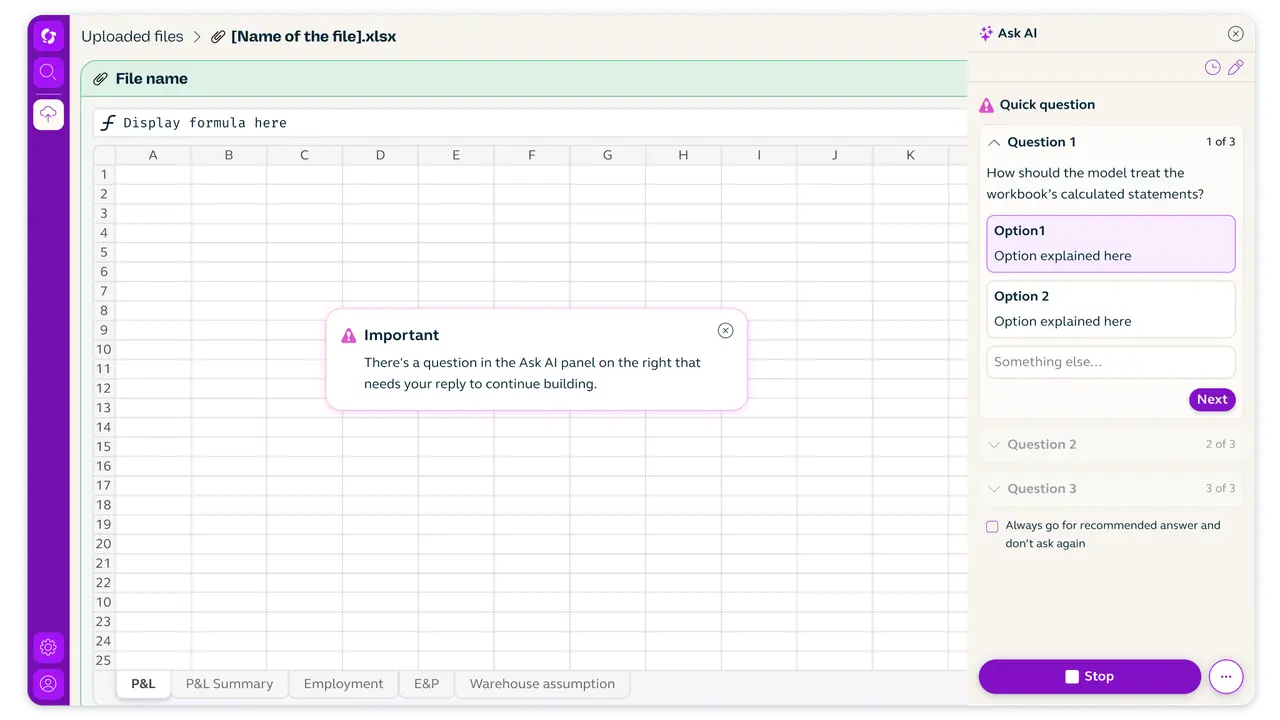
At Kaleidoscope we tackled this problem with a very particular kind of user: expert finance modellers.
Experts who don't arrive empty-handed, but with spreadsheets that are often years old and built against the clock, full of shortcuts only their authors can understand:
missing headers,
numbers typed in by hand instead of formulas,
the same data copied across several sheets to work around the spreadsheet's limits,
colours whose meaning only makes sense to the person who chose them.
What the AI needed to do for us was interpret the spreadsheets and disambiguate the user's intentions. The problem is that LLMs are probabilistic and generative. They push on like mules towards the most common answer, which in our case would very probably have been the wrong one. Users would have ended up with their financial models, yes, but with errors that would take hours to track down and fix.
Following the trend, the most obvious design is chat: you talk to the AI until the model is right. It's also what users expect. But I suspected it was the wrong tool.
So, I designed the opposite. The AI asks, the user answers.
Ask, don't chat
In a guided flow, the questions become the interface.
But we couldn't expect users to answer technical questions, or an endless number of them. So, I followed three principles:
Ask only what matters. Every question had to unblock the model. If the AI could work something out reliably, it didn't ask.
Make answering faster than explaining. Every question offers clear options, so users can choose with a click instead of typing. There's always an open option, in case the answer is different.
Speak like a colleague, not a system. Our users know their spreadsheets, not our system.
At the end, users review the model, where they can inspect the data and see where it came from.
To test the hypothesis, I built a prototype with Claude Code and we put it in front of users before development started.
The bet
It was a risk. Chat is what people expect from AI, and I worried that experts would feel the product as a constraint, a brake on the way they were used to working with AI.
We tested it with five finance users. At the start, we asked them what they thought the screen was showing them. Two saw the AI panel and expected to chat with it: exactly the risk I was worried about.
Then the questions started. All five reacted positively to them, and three said clearly that they valued being guided step by step.
One put it simply:
"I don't have to remember what I need to do next, and simply I just follow them."
Another liked that the AI clarified before generating, instead of assuming and producing "something that's completely wrong that you've been waiting for like 30 minutes to get an output on."
The quote that stayed with me was about trust:
"It's always telling me what it's doing and why it's doing it. So, I feel really like I can trust it because I'm not having to try and work it out or waste my time reverse engineering it."
In general, building a financial model in a spreadsheet takes days, while Kaleidoscope's solution takes around 30 minutes.
Ask first, then chat
None of this means chat is wrong. It means chat is one interface among many. In our case, before the model has been created, there are two contexts: the software's and the user's. The AI knows the first but not the second. It must turn data shaped by the user's mental model into the form that works with the software's conceptual model. Our AI knows what it needs to know, so it's the one that should ask.
Once the model exists and the user wants to explore it, or change something, chat becomes useful. It saves time searching and saves users from having to understand the modelling concepts underneath, which can feel hostile in the early stages, especially because they ask habitual spreadsheet users to change their mental model.
The design world is moving in the same direction. Luke Wroblewski has described a shrinking role for chat, alongside interfaces shaped around the task, where AI offers options, presets and structure instead of an empty field. Chat doesn't disappear. It just stops being the front door.
"When agents can use multiple tools, call other agents and run in the background, users orchestrate AI work more - there's a lot less chatting back and forth" - Luke Wroblewski
So before adding a chat, it's worth asking a few unglamorous questions. What does this person already know? What are they trying to do? Where exactly do they get stuck? What should the AI ask them, and what should it simply work out on its own? The answers rarely lead to an empty chat box.
This is the real job of designing with AI: not adding it to a product but building a bridge between what people know and what the machine can do, so that neither has to guess.
Sources
Jakob Nielsen, 10 Usability Heuristics for User Interface Design, Nielsen Norman Group
Law of conservation of complexity (Tesler's law), Wikipedia
Jakob Nielsen, The Articulation Barrier: Prompt-Driven AI UX Hurts Usability, UX Tigers, 2023
J.D. Zamfirescu-Pereira, Richmond Y. Wong, Bjoern Hartmann and Qian Yang, Why Johnny Can't Prompt: How Non-AI Experts Try (and Fail) to Design LLM Prompts, CHI 2023
Don Norman, The Design of Everyday Things
Amelia Wattenberger, Why Chatbots Are Not the Future, 2023
Grant Gross, That shiny new AI feature? Your customers won't use it, CIO, August 2026 (on Banyan Software's survey)
Design Patterns for AI Interfaces, Smart Interface Design Patterns (summarising Luke Wroblewski's work on the role of chat)